

MAIN FEATURES
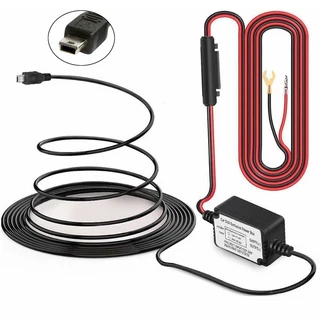
OBD Hardwire kit for WOLFBOX dash cam or other device powered by Type-C port, 5V/3A steady output, voltage input supports from 12V-24V
- High Compatibility - The OBD step-down line can supply power to most of the car electronics (except for Tesla) , plug and play, without damaging any car circuits, and the anti-interference does not affect the normal operation of other devices
- Low Voltage Protect - Multiple Security Protection - With low voltage protection, When the car is turned off the voltage below 13V the recording will continue within 5 minutes, and the power will be turned off after 5 minutes
- Connect and Setup - Connect the OBD hardwire kit to the vehicle OBD interface, and connect the Type-C USB to the dash cam. Then start the car, turn on the dash cam, and set the parking monitor mode
- Installation Location - The most common location of the car OBD interface for the driver is the lower left of the trim panel under the steering wheel. However, the location of the OBD will be slightly different depending on the origin and model year of the vehicle. Some are above the accelerator pedal, or near the driver's side fuse box, some are in front of the shift lever, etc. Please choose the most suitable location for installation
UK Deliveries: Free UK mainland delivery applies to orders over £30 (exceptions apply to remote regions and islands, which will see a surcharge at checkout).
Orders Under 2kg: Most in-stock items arrive in 2–3 working days. Items held by suppliers take 4–6 working days. (Note: Saturday is not a working day).
Orders Over 2kg: Dispatched via trusted couriers including AMAZON Shipping, Royal Mail, DPD, and UPS.
Royal Mail Specifics: Royal Mail aims to deliver in 1–3 working days, though this is not guaranteed. If your item has not arrived after 7 days, please contact us. We can only replace missing items after 14 days have passed.
More information (including international delivery on our Delivery Information page.
MAIN FEATURES
OBD Hardwire kit for WOLFBOX dash cam or other device powered by Type-C port, 5V/3A steady output, voltage input supports from 12V-24V
- High Compatibility - The OBD step-down line can supply power to most of the car electronics (except for Tesla) , plug and play, without damaging any car circuits, and the anti-interference does not affect the normal operation of other devices
- Low Voltage Protect - Multiple Security Protection - With low voltage protection, When the car is turned off the voltage below 13V the recording will continue within 5 minutes, and the power will be turned off after 5 minutes
- Connect and Setup - Connect the OBD hardwire kit to the vehicle OBD interface, and connect the Type-C USB to the dash cam. Then start the car, turn on the dash cam, and set the parking monitor mode
- Installation Location - The most common location of the car OBD interface for the driver is the lower left of the trim panel under the steering wheel. However, the location of the OBD will be slightly different depending on the origin and model year of the vehicle. Some are above the accelerator pedal, or near the driver's side fuse box, some are in front of the shift lever, etc. Please choose the most suitable location for installation
UK Deliveries: Free UK mainland delivery applies to orders over £30 (exceptions apply to remote regions and islands, which will see a surcharge at checkout).
Orders Under 2kg: Most in-stock items arrive in 2–3 working days. Items held by suppliers take 4–6 working days. (Note: Saturday is not a working day).
Orders Over 2kg: Dispatched via trusted couriers including AMAZON Shipping, Royal Mail, DPD, and UPS.
Royal Mail Specifics: Royal Mail aims to deliver in 1–3 working days, though this is not guaranteed. If your item has not arrived after 7 days, please contact us. We can only replace missing items after 14 days have passed.
More information (including international delivery on our Delivery Information page.