

MAIN FEATURES
ACV – Premium Quality Installation Components
Many modern vehicles are equipped with manufacturer‑specific head units designed to match the dashboard’s original appearance. ACV installation kits provide all the essential components required to replace an OEM head unit with an aftermarket system.
Depending on the vehicle’s specification, the kit may include the necessary adapters and interfaces to ensure correct operation of the new unit and to retain supported vehicle functions.
This ACV installation kit is to provide you with the basic installation products required to complete a new radio installation into your vehicle.
Note: Before installation, please review the compatibility notes for each component.
Features:
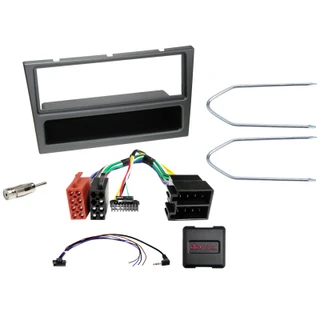
- Complete Installation Solution – Includes the components required to replace the factory head unit with a compatible aftermarket model. Comes with fascia, SWC interface and antenna adaptor.
- SWC Connector Kits – Supplies all necessary analogue steering wheel control signals for operating a retrofit head unit.
- Vehicle‑Specific Adaptation – Components vary depending on the vehicle’s equipment level and the functionality of the chosen aftermarket unit.
- Plug and Play Install - The components provided are designed to make the installation as easy as possible.
Note: OEM Function Awareness – Some vehicle functions or settings may not be supported by the retrofit head unit. Check the original OEM head unit, vehicle settings, and available functions before installation.
Final System Check – Confirm vehicle functionality, settings access, and steering wheel control operation before completing the installation.
VEHICLE COMPATIBILITY LIST
This kit has been put together for the following vehicles, depending on the factory fitted head unit. See notes for important information regarding this.
Designed For:
- Opel Corsa D (S07) 12/2008 – 08/2014
Products:
- Colour: Piano Black
- Head Unit Display Cut‑Out: 1-DIN with compartment
- System Type: CANBUS Vehicle
Connection Types
- 40-pin Quadlock Opel connector – Main vehicle interface
- OEM steering wheel remote control → 3.5 mm jack / loose cable
- OEM antenna Fakra (male) → DIN (male)
- Support voltage → loose cable
- Blue/white wire: +12V antenna remote
Provided Signals
- Red: +12V ignition terminal 15 (fused in fuse box)
- Orange: +12V lighting terminal 58
- Purple/White: +12V reverse signal
- Pink: Speed signal
- Green: Ground (GND) / Handbrake signal
- Output load capacity: 250 mA max
- Current requirement > 250 mA:
- 1 relay coil resistance ≥ 75 ohms
- 2 relays coil resistance ≥ 150 ohms
Supported / Not Supported Functions
Depending on vehicle equipment, software version, and the retrofit head unit, some functions may not be available.
May Be Limited or Not Supported.
- Vehicle settings supported (see owner’s manual)
- Steering wheel remote control
- Driver assistance system functions may be unavailable (Trailer Assist, eCall, etc.)
OEM Head Unit Compatibility Notes
This kit is suitable for:
- CD30 / CD30MP / CDC40 / CD50 / CD70 / DVD 90 OEM units
- Blaupunkt / Delphi / Siemens VDO OEM units
- DIP switch settings per retrofit kit manufacturer (see aftermarket manual)
- Vehicles with interface failure after extended operation:
- Connect OEM device
- Reset CAN bus
- Alternative CAN bus tap: 32-pin OEM display connector CAN High / CAN Low → Pin 20 / Pin 23
- Comfort CAN to Climatronic alternative tap
Important Installation Notes
- Verify all OEM device functions and vehicle settings before removal
- Disassemble OEM device with power off
- Check all interface connections for correctness and continuity with power off
- Configure interface settings and hardware configuration with power off
- Check radio connection cable configuration
- Connect radio connection cable per aftermarket device instructions
- Connect all other connections per aftermarket device instructions
- Connect entire installation to vehicle; live connection last
- Configure interface software per product text and manual
- Configure aftermarket device per operating instructions (SWC, antenna, hands-free, etc.)
- Test steering wheel remote control and vehicle functions
- Any hardware or cable configuration changes must be made with power off; repeat steps 5–8 after changes
- In case of malfunction:
- Revert to OEM device
- Operate OEM device
- Put CAN bus into standby mode
- Check interface hardware configuration
- Reconnect CAN bus and continue as above
- Connections, modifications, or extensions are for trained personnel only
- Further changes or alternative connections must be verified for manufacturer approvals, functionality, and warranty impact
- All connections and modifications are at own risk; may void product warranty
UK Deliveries: Free UK mainland delivery applies to orders over £30 (exceptions apply to remote regions and islands, which will see a surcharge at checkout).
Orders Under 2kg: Most in-stock items arrive in 2–3 working days. Items held by suppliers take 4–6 working days. (Note: Saturday is not a working day).
Orders Over 2kg: Dispatched via trusted couriers including AMAZON Shipping, Royal Mail, DPD, and UPS.
Royal Mail Specifics: Royal Mail aims to deliver in 1–3 working days, though this is not guaranteed. If your item has not arrived after 7 days, please contact us. We can only replace missing items after 14 days have passed.
More information (including international delivery on our Delivery Information page.
MAIN FEATURES
ACV – Premium Quality Installation Components
Many modern vehicles are equipped with manufacturer‑specific head units designed to match the dashboard’s original appearance. ACV installation kits provide all the essential components required to replace an OEM head unit with an aftermarket system.
Depending on the vehicle’s specification, the kit may include the necessary adapters and interfaces to ensure correct operation of the new unit and to retain supported vehicle functions.
This ACV installation kit is to provide you with the basic installation products required to complete a new radio installation into your vehicle.
Note: Before installation, please review the compatibility notes for each component.
Features:
- Complete Installation Solution – Includes the components required to replace the factory head unit with a compatible aftermarket model. Comes with fascia, SWC interface and antenna adaptor.
- SWC Connector Kits – Supplies all necessary analogue steering wheel control signals for operating a retrofit head unit.
- Vehicle‑Specific Adaptation – Components vary depending on the vehicle’s equipment level and the functionality of the chosen aftermarket unit.
- Plug and Play Install - The components provided are designed to make the installation as easy as possible.
Note: OEM Function Awareness – Some vehicle functions or settings may not be supported by the retrofit head unit. Check the original OEM head unit, vehicle settings, and available functions before installation.
Final System Check – Confirm vehicle functionality, settings access, and steering wheel control operation before completing the installation.
VEHICLE COMPATIBILITY LIST
This kit has been put together for the following vehicles, depending on the factory fitted head unit. See notes for important information regarding this.
Designed For:
- Opel Corsa D (S07) 12/2008 – 08/2014
Products:
- Colour: Piano Black
- Head Unit Display Cut‑Out: 1-DIN with compartment
- System Type: CANBUS Vehicle
Connection Types
- 40-pin Quadlock Opel connector – Main vehicle interface
- OEM steering wheel remote control → 3.5 mm jack / loose cable
- OEM antenna Fakra (male) → DIN (male)
- Support voltage → loose cable
- Blue/white wire: +12V antenna remote
Provided Signals
- Red: +12V ignition terminal 15 (fused in fuse box)
- Orange: +12V lighting terminal 58
- Purple/White: +12V reverse signal
- Pink: Speed signal
- Green: Ground (GND) / Handbrake signal
- Output load capacity: 250 mA max
- Current requirement > 250 mA:
- 1 relay coil resistance ≥ 75 ohms
- 2 relays coil resistance ≥ 150 ohms
Supported / Not Supported Functions
Depending on vehicle equipment, software version, and the retrofit head unit, some functions may not be available.
May Be Limited or Not Supported.
- Vehicle settings supported (see owner’s manual)
- Steering wheel remote control
- Driver assistance system functions may be unavailable (Trailer Assist, eCall, etc.)
OEM Head Unit Compatibility Notes
This kit is suitable for:
- CD30 / CD30MP / CDC40 / CD50 / CD70 / DVD 90 OEM units
- Blaupunkt / Delphi / Siemens VDO OEM units
- DIP switch settings per retrofit kit manufacturer (see aftermarket manual)
- Vehicles with interface failure after extended operation:
- Connect OEM device
- Reset CAN bus
- Alternative CAN bus tap: 32-pin OEM display connector CAN High / CAN Low → Pin 20 / Pin 23
- Comfort CAN to Climatronic alternative tap
Important Installation Notes
- Verify all OEM device functions and vehicle settings before removal
- Disassemble OEM device with power off
- Check all interface connections for correctness and continuity with power off
- Configure interface settings and hardware configuration with power off
- Check radio connection cable configuration
- Connect radio connection cable per aftermarket device instructions
- Connect all other connections per aftermarket device instructions
- Connect entire installation to vehicle; live connection last
- Configure interface software per product text and manual
- Configure aftermarket device per operating instructions (SWC, antenna, hands-free, etc.)
- Test steering wheel remote control and vehicle functions
- Any hardware or cable configuration changes must be made with power off; repeat steps 5–8 after changes
- In case of malfunction:
- Revert to OEM device
- Operate OEM device
- Put CAN bus into standby mode
- Check interface hardware configuration
- Reconnect CAN bus and continue as above
- Connections, modifications, or extensions are for trained personnel only
- Further changes or alternative connections must be verified for manufacturer approvals, functionality, and warranty impact
- All connections and modifications are at own risk; may void product warranty
UK Deliveries: Free UK mainland delivery applies to orders over £30 (exceptions apply to remote regions and islands, which will see a surcharge at checkout).
Orders Under 2kg: Most in-stock items arrive in 2–3 working days. Items held by suppliers take 4–6 working days. (Note: Saturday is not a working day).
Orders Over 2kg: Dispatched via trusted couriers including AMAZON Shipping, Royal Mail, DPD, and UPS.
Royal Mail Specifics: Royal Mail aims to deliver in 1–3 working days, though this is not guaranteed. If your item has not arrived after 7 days, please contact us. We can only replace missing items after 14 days have passed.
More information (including international delivery on our Delivery Information page.