

MAIN FEATURES
Audio Tech Direct now offers a range of cable adaptors to allow an after-market camera to be connected to the OEM factory radio. These are a great way of adding some much needed parking assistance to your factory radio. Please read the listing description carefully as coding and variants with the factory radio may apply.
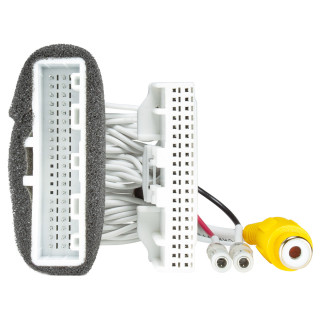
This cable for rear view camera connection in Nissan Leaf cars with OEM Nissan EV GEN1 and Nissan EV GEN2 multimedia system. Using this cable you will be able to install an aftermarket camera Plug & Play without damaging the car wires. Image from the rear view camera will automatically be displayed on the screen when reversing. Dynamic parking lines that will turn with the steering wheel will be displayed on the camera image. Parking lines can be adjusted in the service menu (see parking lines adjustment manual). The device is connected to the 40 pin socket (as shown in the connection diagram). Depending on your car radio model, this socket may be located in a different place from the one shows in the diagram. After connection all OEM devices that work using this socket will not be disturbed and will continue to work as they did prior to the connection.
The 40 pin OEM camera adapter cable to allow you to add an aftermarket rear view camera to Nissan Leaf cars with OEM Nissan EV GEN1 and EV GEN2 multimedia systems.
Upon installation, image from the aftermarket camera will automatically be displayed on the screen when reversing and parking lines can be adjusted in the service menu.
Features & Benefits:
- Depending on the car radio model, the 40 pin socket may be located in a different place from the one shown in the diagram
- Power of the additionally installed rear view camera should be taken from the ACC line (first key turn) otherwise camera input will not be active
- Only supports NTSC cameras
VEHICLE COMPATIBILITY LIST
For models with Clarion with motorized display EV GEN1 and EV GEN2 multimedia systems.
Vehicle fitment (guide only):
- Nissan Leaf (2011-2017)
- Nissan e-NV200 (2014-2017)
PLEASE NOTE:
- If your car radio was not installed by the manufacturer, the backup activation signal may be absent from the wires connected to the car radio. For cases like this there’s a grey REV wire in our cable. +12 V should be supplied to this wire when the car is switched to reverse (may be taken from the rear lamp). Also, you may check the connection of this activation signal in the diagnostics menu.
- The additionally installed rear view camera should be powered from ACC line (first turn of the key), otherwise the camera input will be not active. Depending on the type of the camera to be connected, namely on the voltage required for the camera, you can use input voltage +6 V, which the monitor produces. In case the camera requires more than +6 V, connect the camera power to ACC line.
UK Deliveries: Free UK mainland delivery applies to orders over £30 (exceptions apply to remote regions and islands, which will see a surcharge at checkout).
Orders Under 2kg: Most in-stock items arrive in 2–3 working days. Items held by suppliers take 4–6 working days. (Note: Saturday is not a working day).
Orders Over 2kg: Dispatched via trusted couriers including AMAZON Shipping, Royal Mail, DPD, and UPS.
Royal Mail Specifics: Royal Mail aims to deliver in 1–3 working days, though this is not guaranteed. If your item has not arrived after 7 days, please contact us. We can only replace missing items after 14 days have passed.
More information (including international delivery on our Delivery Information page.
MAIN FEATURES
Audio Tech Direct now offers a range of cable adaptors to allow an after-market camera to be connected to the OEM factory radio. These are a great way of adding some much needed parking assistance to your factory radio. Please read the listing description carefully as coding and variants with the factory radio may apply.
This cable for rear view camera connection in Nissan Leaf cars with OEM Nissan EV GEN1 and Nissan EV GEN2 multimedia system. Using this cable you will be able to install an aftermarket camera Plug & Play without damaging the car wires. Image from the rear view camera will automatically be displayed on the screen when reversing. Dynamic parking lines that will turn with the steering wheel will be displayed on the camera image. Parking lines can be adjusted in the service menu (see parking lines adjustment manual). The device is connected to the 40 pin socket (as shown in the connection diagram). Depending on your car radio model, this socket may be located in a different place from the one shows in the diagram. After connection all OEM devices that work using this socket will not be disturbed and will continue to work as they did prior to the connection.
The 40 pin OEM camera adapter cable to allow you to add an aftermarket rear view camera to Nissan Leaf cars with OEM Nissan EV GEN1 and EV GEN2 multimedia systems.
Upon installation, image from the aftermarket camera will automatically be displayed on the screen when reversing and parking lines can be adjusted in the service menu.
Features & Benefits:
- Depending on the car radio model, the 40 pin socket may be located in a different place from the one shown in the diagram
- Power of the additionally installed rear view camera should be taken from the ACC line (first key turn) otherwise camera input will not be active
- Only supports NTSC cameras
VEHICLE COMPATIBILITY LIST
For models with Clarion with motorized display EV GEN1 and EV GEN2 multimedia systems.
Vehicle fitment (guide only):
- Nissan Leaf (2011-2017)
- Nissan e-NV200 (2014-2017)
PLEASE NOTE:
- If your car radio was not installed by the manufacturer, the backup activation signal may be absent from the wires connected to the car radio. For cases like this there’s a grey REV wire in our cable. +12 V should be supplied to this wire when the car is switched to reverse (may be taken from the rear lamp). Also, you may check the connection of this activation signal in the diagnostics menu.
- The additionally installed rear view camera should be powered from ACC line (first turn of the key), otherwise the camera input will be not active. Depending on the type of the camera to be connected, namely on the voltage required for the camera, you can use input voltage +6 V, which the monitor produces. In case the camera requires more than +6 V, connect the camera power to ACC line.
UK Deliveries: Free UK mainland delivery applies to orders over £30 (exceptions apply to remote regions and islands, which will see a surcharge at checkout).
Orders Under 2kg: Most in-stock items arrive in 2–3 working days. Items held by suppliers take 4–6 working days. (Note: Saturday is not a working day).
Orders Over 2kg: Dispatched via trusted couriers including AMAZON Shipping, Royal Mail, DPD, and UPS.
Royal Mail Specifics: Royal Mail aims to deliver in 1–3 working days, though this is not guaranteed. If your item has not arrived after 7 days, please contact us. We can only replace missing items after 14 days have passed.
More information (including international delivery on our Delivery Information page.